


SONOFF Zigbee 3.0 USB Dongle Plus | ZBDongle-P
USD$19.90
- Pre-flashed with Z-Stack 3.x.0 coordinator firmware
- Can use ZHA in Home Assistant or use Zigbee2MQTT
- Base on TI CC2652P + CP2102(N)
- +20dBm output gain
- SMA interface external antenna
- Aluminum housing effectively reduces signal interference from peripherals
- Optional 1.5m USB extension cable for better signal range
SONOFF Zigbee 3.0 USB Dongle Plus can works with the devices below:
Router: ZBMINI smart switch, S40 Lite ZB smart plug, S31 Lite ZB smart plug, S26R2ZB smart switch
End Device: ZBMINI-L smart switch, SNZB-01 switch, SNZB-02 Temp. and Hum. sensor, SNZB-03 motion sensor, SNZB-04 door/window sensor
Note: Use Dongle Flasher Web tool or Add-on to flash other firmware faster. Switch to other device types in 1minute.
Web: https://dongle.sonoff.tech/sonoff-dongle-flasher/
Add-on: https://github.com/iHost-Open-Source-Project/hassio-ihost-addon/tree/master/hassio-ihost-sonoff-dongle-flasher


 How to add Zigbee devices to home assistant via SONOFF zigbee 3.0 USB dongle plus.



SONOFF Zigbee 3.0 USB Dongle Plus is a universal Zigbee USB stick. It can be used as a universal Zigbee gateway in Home Assistant or other open-source platforms via ZHA or Zigbee2MQTT to locally control all your Zigbee sub-devices, so you don't need to invest in the Zigbee hubs for different brands, all you need is a universal gateway - Dongle Plus!
The dongle plus has a wide range of supported devices, such as BASICZBR3, S31 Lite zb, SNZB01, SNZB02, SNZB03, SNZB04, ZBMINI, S26R2ZB , and various sub-devices from various brands or flash router firmware to extend the network range.
The limits of ZBDongle Plus are 21 direct children and up to 40 children (Default values from official firmware).
If you want to connect to 50 direct children and up to 200 children, flash the latest firmware by yourself. Please refer to this link: Z-Stack-firmware/coordinator at master · Koenkk/Z-Stack-firmware · GitHub
Install Driver
Note: Raspberry Pi (Linux) is recommended, if you use Windows or macOS, you need to install Driver first.
Windows: CP210x_Windows_Drivers_with_Serial_Enumeration
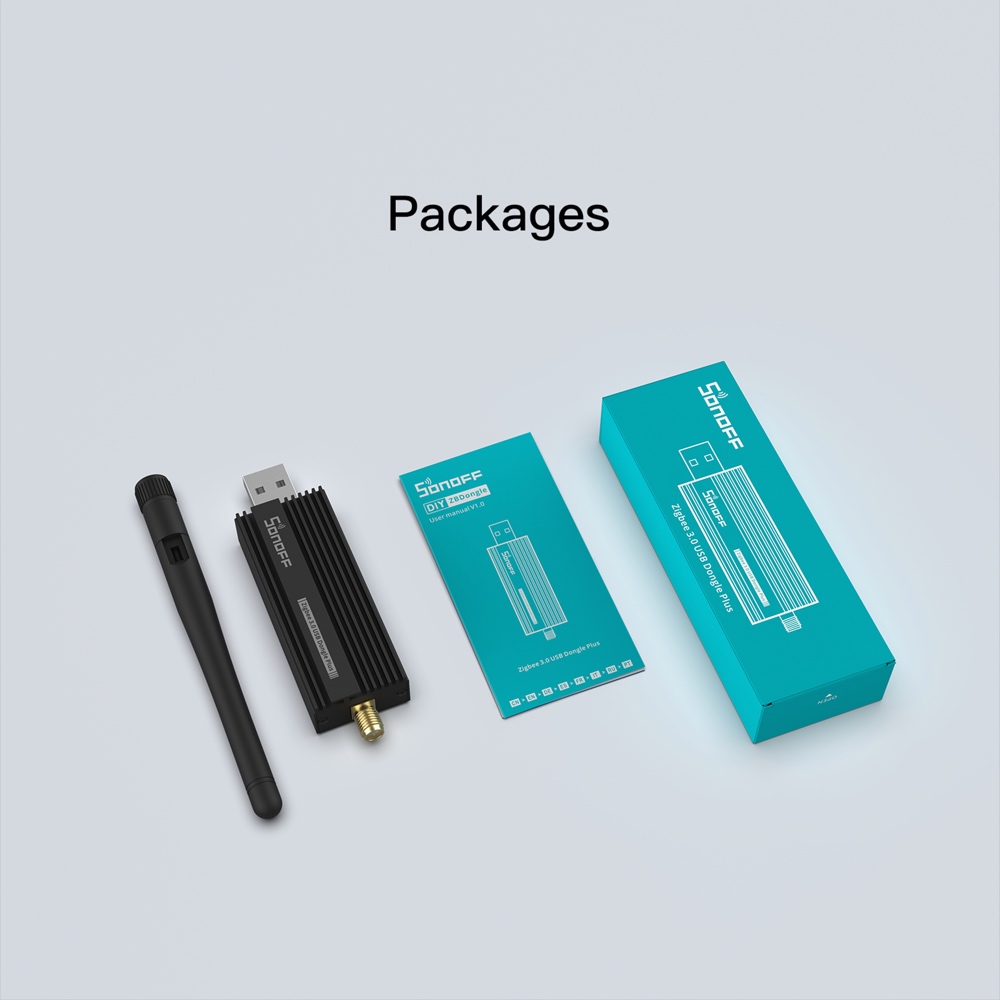
Package includes :
1 * Zigbee 3.0 USB Dongle Plus
1 * Antenna
1 * User Manual
Documents:
Additional information
| Weight | 50 g |
|---|---|
| Dimensions | 111 × 40 × 17 mm |
| Brand | |
| Model | ZBDongle-P |
| Working temperature | -10℃-40℃ |
| Input | DC 5V (100mA Max) |
| Wireless | Zigbee 3.0 |
| Shell material | Alumium alloy |
FAQ
Zigbee dongle plus is pre-installed with coordinator firmware, which can only be used to add sub-devices and cannot be added by other gateways (the Zigbee protocol stipulates that there can only be one gateway in each Zigbee network). If you need to expand the Zigbee signal range, you can follow our tutorial to flash the router firmware, Zigbee dongle plus running routing firmware will disguise itself as a light bulb. But in Z2M, you can only avoid having to re-pair everything when moving between controllers/routers that use the same Zigbee chip. if the 2 dongles use different ones, you'll have to recreate the network from scratch. No. Z2M and ZHA are the same protocol (Zigbee). You can run one or the other, or buy a second dongle and run both on separate dongles. Yeah, you can run two dongles at the same time. One in ZHA, the other one in Z2M, as long as you can uniquely identify them on the USB ports and keep separate Zigbee channels, ZHA defaults to 15, Z2M defaults to 11. The main differences between ZBDongle-P and ZBDongle-E are the chip and the supported platform. ZBdongle-P uses CC2652P while ZBDongle-E EFR32MG21, and ZBDongle-E supports Openhab but ZBDongle-P doesn't support yet. 50 children Zigbee devices can be directly added to the ZBDongle-P in coordinator mode and max 200 zigbee devices with routers 30 children Zigbee devices can be directly added to the ZBDognle-E in coordinator mode and extra 30 zigbee devices with a router, no limit on firmware but depends on platforms. SONOFF Zigbee Dongle Plus works great with most Zigbee devices, including popular brands like Sonoff, Aqara, Philips Hue, Huawei, IKEA, Tuya, and many more, mainly depends on the home automation platform on which the user uses dongle Plus: Zigbee2MQTT: https://www.zigbee2mqtt.io/guide/supported-hardware.html In addition to check the supported devices through the official platform, you also can view Blakadder compatibility lists which provides an extensive overview of the devices supported by different platforms. Please check this guide to learn the detailed steps Just press and hold the reset button for more than 8 seconds and then release it. When you see the green light flashing, you will enter the pairing mode.1.Do I need a USB extension cable
2.How to check the firmware of SONOFF dongle plus and flash the firmware
3.How to flash Zigbee dongle plus as Router?
4.How to migrate from other dongle to SONOFF Dongle Plus?
5.Can i run 2 Dongles with ZHA simultaneously
6.Can i run Zigbee2MQTT and ZHA together on the same Dongle plus?
7.Can i run 2 Dongles with ZHA and Zigbee2MQTT on the same machine together
8.How to migrate from ZHA to Zigbee2MQTT using Sonoff Zigbee dongle plus?
9.What is the difference between ZBDongle-P and ZBDongle-E
10.How many devices can Sonoff Zigbee 3.0 USB dongle support
11.Devices supported by SONOFF Zigbee Dongle Plus
ZHA: https://www.home-assistant.io/integrations/zha
ioBroker: https://github.com/Jey-Cee/ioBroker.deconz
Domoticz:https://github.com/Smanar/Domoticz-deCONZ
Openhab:https://www.openhab.org/addons/bindings/deconz/
Jeedom: https://compatibility.jeedom.com/index.php?v=d&p=home&protocol=Zigbee12.How to set up Zigbee2MQTT and ZHA on Home Assistant using Sonoff Zigbee Dongle Plus
13.How to put the device with router firmware into the pairing mode?
New Arrival

-
 New
NewSONOFF ZBMINI Extreme Zigbee Smart Switch (Neutral Wire Required) | ZBMINIR2
USD$12.90 Add to cart -
Sale!
 New-25%
SONOFF NSPanel Pro Smart Home Control Panel-120 Type
Original price was: USD$119.90.USD$89.90Current price is: USD$89.90. Select options This product has multiple variants. The options may be chosen on the product page -

SONOFF Zigbee Smart Water Valve
USD$26.90 Select options This product has multiple variants. The options may be chosen on the product page -
 New
NewSONOFF iPlug Zigbee Smart Plug | S60 Series
USD$13.50 Select options This product has multiple variants. The options may be chosen on the product page -
 New
NewSONOFF MINI Dry Wi-Fi Smart Switch | MINI-D
USD$12.90 Add to cart -
 New
NewSONOFF SNZB-02LD IP65 Zigbee LCD Smart Thermometer (Probe Version)
USD$17.90 Add to cart
Related products
-
 New
NewSONOFF Zigbee Water Leak Sensor | SNZB-05P
Price range: USD$9.90 through USD$15.90 Select options This product has multiple variants. The options may be chosen on the product page -
Sale!
 -10%
-10%SONOFF iHost Smart Home Hub
Price range: USD$71.90 through USD$99.90 Select options This product has multiple variants. The options may be chosen on the product page -

SONOFF Zigbee Temperature and Humidity Sensor | SNZB-02P
USD$10.90 Add to cart -

SONOFF DW2-Wi-Fi – Wireless Door/Window Sensor
Price range: USD$6.99 through USD$61.50 Select options This product has multiple variants. The options may be chosen on the product page
