



SONOFF NSPanel Pro Smart Home Control Panel
Original price was: USD$119.90.USD$89.90Current price is: USD$89.90.
Limited Time 25% OFF | Get Other SONOFF Items 10% OFF with coupon code: SONOFFN10
Free Standard Shipping on Orders over $89
【All in One Panel Control】Unlimited number of control devices, supports control all SONOFF devices, from smart lights, smart cameras, and security sensors to switches, etc., and will continue to support SONOFF’s new device in the future.
【Build-in Zigbee Hub】Quickly add Zigbee devices on the screen in batches. Standard Zigbee 3.0 protocol makes the connection more stable and the coverage wider. Added sub-devices can be voice-controlled by using Alexa, Google Home, and more.
【Home Security】Customize 3 modes by setting different arming devices. After arming, once the sensor is triggered, the panel will alarm, and you will receive a notification alert on the phone.
【Temp-Control】Choose the temperature source(like TH Elite) and execution devices(MINIR4M, ZBMINIL2…) to form your own thermostat. Keep a suitable room temperature for you.
【Camera Viewer】NSPanel Pro can be used as a display and supports adding the following four types of cameras for live monitoring. You can view the real-time monitoring of the living room, garage, bedroom, etc on the panel at any time.
Note: NSPanel Pro V3.8.0 has been released, you can explore the new function in below updates tab.
Click to learn more about NSPanel Pro supported devices list.
If you want to purchase the NSPanel Pro 120 Type, please click this link.




NSPanel Pro supports devices list:
| Protocol | Product Type | Model |
| Wi-Fi | DIY Smart Switch | MINI-D, MINIR2, MINIR3, MINIR4, MINIR4M, BASICR2, BASICR3, BASICR4, RFR2, DUALR2, 4CHR3/4CHPROR3, TH10/TH16,TH Origin, TH Elite,POWR2, POWR3, POW Origin, POW Elite, Micro, Micro-MFG, SlampherR2, DUALR3/ DULAR3 Lite,SPM-4Relay, POWCT, ZBMicro |
| Smart Wall Switch | TX, TX Ultimate, M5, IW101/IW100, M5 Matter | |
| Smart Lighting | D1, B02/B05-BL, LED Filament Bulb, Smart LED Bulb,L1, L1 Lite, L2, L2 Lite, L3, L3-P | |
| Home Security & Sensor | CAM S2, CAM-Slim, GK-200MP2-B, DW2-Wi-Fi | |
| Central Control Panel | NSPanel | |
| Smart Plug | S26, S26R2, S31/S31 Lite, S40/S40 Lite, S60 | |
| Zigbee | DIY Smart Switch | ZBMINIR2, ZBMINI, BASICZBR3, ZBMINI-L, ZBMINL2, SNZB-01,SNZB-01P |
| Sensor | SNZB-02LD, SNZB-02WD, SNZB-02D, SNZB-02P,SNZB-02, SNZB-03, SNZB-04, SNZB-06P, SNZB-03P, SNZB-04P, SNZB-05P | |
| Wall Switches | ZBM5 | |
| Home Appliance | ZBCurtain, TRV, SWV | |
| Smart Plug | S26R2ZB, S31ZB Lite, S40ZB Lite | |
| eWeLink-Remote | DIY Smart Switch | S-MATE, S-MATE2 |
| Scene Controller | R5 |
Overview
SONOFF NSPanel Pro is a smart home control panel. Your smart lights, switches, heaters, coolers, curtains, and all your smart devices can be controlled. An unlimited number of control devices, all in one panel.
NSPanel Pro can quickly add Zigbee devices on the screen in batches. Standard Zigbee 3.0 protocol makes the connection more stable and the coverage wider. Support all SONOFF Zigbee devices such as SNZB-01P, SNZB-02P, ZBMINIL2.
NSPanel Pro can be used as a display and supports adding cameras for live monitoring. Viewing the real-time monitoring of the living room, garage, bedroom, etc on the panel at any time.
Power Consumption Graph, Customize Wallpaper, and Call Intercom...It will update more features and support Matter in the future. NSPanel Pro will be your wonderful choice.
Package includes :
1 * NSPanel Pro
1 * User Manual
Documents
More video
Additional information
| Weight | 226 g |
|---|---|
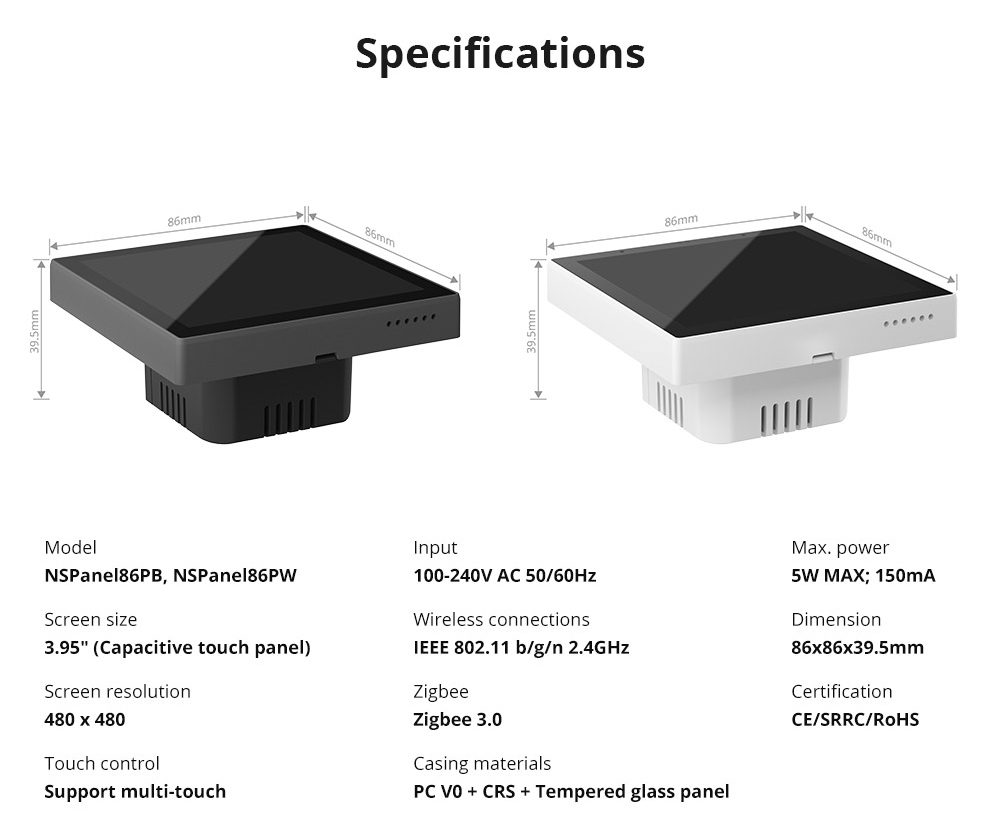
| Dimensions | 91.5 × 91.5 × 50 mm |
| Zigbee | IEEE 802.15.4 (Zigbee 3.0) |
| Wi-Fi | IEEE 802.11 b 2.4GHz |
| Input | 100-240V AC 50/60Hz |
| Max Power Consumption | 5W MAX; 150mA |
| TFT Screen Size | 3.95" (Capacitive Screen) |
| Screen Resolution | 480 x 480 |
| MCU | PX30 |
| CPU | 4-cores Cortex-A35 |
| GPU | Mali-G31GPU |
| RAM | 2GB, DDR3 |
| ROM | 8GB, eMMC 5.1 |
| Certifications | CE/UKCA/ SRRC/RoHS |
| Shell Materials | PC V0+CRS+Toughened Glass |
| Dimension | 86x86x39.5mm |
FAQ
1. Which Zigbee sub-devices can be added to NSPanel Pro?
It supports all SONOFF Zigbee devices and other brands devices with standard protocols. Philips Hue lights and IKEA lights will be supported in 1.2.0.
2. Does NSPanel Pro have relays?
It doesn’t have the relay. NSPanel Pro is a smart home control panel.
3. How is it works with Home Assistant?
Sync the devices from Home Assistant to eWeLink App through add-on, then add the Home Assistant's devices to the panel by adding widgets. It will be available in V1.5.0.
4. What kinds of cameras does NSPanel Pro support?
NSPanel pro supports adding four types of cameras: SONOFF Camera, RTSP Camera, ESP32 Camera and eWeLink Camera app.
5. Does NSPanel Pro support Matter?
Yes, NSPanel Pro can be used as a Matter hub (Matter Controller), allowing you to add Matter devices from different manufacturers to the eWeLink APP for management and control! Support adding Matter bridges from different brands, and you can sync switch devices under the bridge to NSPanel Pro.
6. Will there be updates to it in the future?
Yes, we will continuously optimize NSPanel Pro based on customer needs.
Updates
NSPanel Pro V3.8.0 Release!
Support automatic switching between daylight saving time and standard time. The Zigbee sub-device added to NSPanel Pro will automatically adjust the timer settings based on the local time zone. (APP version 5.13.1 or later required.)
NSPanel Pro V3.7.1 Release!
1. WebShortcut now supports page zoom and text size adjustment.
2. Added an option to reboot your NSPanel Pro via eWeLink App. (App version 5.13.0 or later is required)
3. Delayed arming/disarming are available to prevent false alarms when sensors are triggered.
NSPanel Pro V3.7.0 Release!
1. Web Shortcut Function: Pin your favorite web pages as shortcuts to the screen for instant, one-tap access. It even auto-discovers LAN services on Home Assistant and iHost Cast console.
2. Full-Screen Display: Improved view with full-screen webpages.
3. Local Control for Zigbee & Matter Devices: If your trigger device and execution device of the thermostat are added via NSPanel Pro, you can control them locally through NSPanel Pro.
4. Enhanced TRVZB Support: TRVZB added to NSPanel Pro supports setting the temperature source from an external sensor.
NSPanel Pro V3.6.1 Release!
1. Added support for Matter Light Sensor.
2. Predefined device names will now sync during Matter device setup for easier identification.
3. Now you can create up to 10 Energy Dashboards for NSPanel Pro in eWeLink app (App version 5.11.0 and NSPanel Pro firmware version 3.6.1 or later are required).
NSPanel Pro V3.6.0 Release!
Expanded support for controlling eligible Wi-Fi devices via LAN and for syncing logs when Zigbee devices reconnect to the network.
NSPanel Pro V3.5.0 Release!
New Updates:
1. Control eligible Wi-Fi devices via LAN on NSPanel Pro. ( For specific devices list, please refer here: NSPanel Pro Supported Devices List)
2. Microphone muting is available during voice calls.
3. Support viewing real-time power data from POWCT on the screen.
Optimization:
1. Improved the display of device status on the home screen. It can display the current status of the human presence / Door/Window / water leak sensor.
2. The temperature range of the thermostat is adjusted to 4-40℃.
NSPanel Pro V3.4.0 Release!
New Updates:
1. Support SONOFF SNZB-05P Water Leak Sensor
2. Now you can change the text size in Reminder (Notepad).
3. Support disarming the alarm and resetting the device with a security code.
4. Added support for minimizing ongoing voice call to a floating bubble.
Optimization:
1. Optimized NSPanel Pro UI design and user experience. Support adjusting light color, brightness, and more; and controlling multi-channel switches on the home screen.
2. Optimized the UI and interaction of the device split screen, long press the device icon to enter the device control settings.
3. Optimized the temperature and humidity sensor icon, different font colors correspond to different temperatures or humidity.
4. Optimized the icons of motion sensor, water leak sensor and door/window sensor, and the icons will flash when the sensor is triggered.
5. Optimized the alarm on the NSPanel Pro, and you can view the ringtone type and repeat time.
NSPanel Pro V3.3.0 Release!
1. Support SONOFF Zigbee Smart Water Valve SWV.
2. Support Matter human Presence sensor and Wireless Switch.
3. Set the device state to On/Off/Keep after the thermostat is disabled.
4. The home screen widget can add the camera and timer.
NSPanel Pro V3.2.0 Release!
In the new version, you can upload your favorite music to customize your NSPanel Pro ringtone in eWeLink APP setting. Please kindly note that:
1. Only MP3, FLAC, OGG, and WAV file formats are supported.
2. It is recommended to upload files smaller than 2MB. Files larger than 10MB are not supported.
New Design and New Experience in V3.0.0!

NSPanel Pro has introduced a new UI system called RUBIK in V3.0.0. You can customize different layouts for the home screen, or set devices and scenes on the same extended screen. This makes NSPanel Pro flexible like a Rubik's Cube, allowing for easier management of devices.
| Before | After | |
| Home Screen | ● Fixed layout ● Fixed widgets | ● 12 different layouts ● Customizable widgets |
| Extended Screen | ● Devices and scenes need to be displayed on different pages. ● Display up to 4 devices or scenes on one page. | ● Devices and scenes can be displayed on the same pages. ● Display up to 9 devices or scenes on one page. |
Home Screen Customize
NSPanel Pro supports customizing the home screen. In eWeLink APP -- Theme Settings, there are 12 different layouts to choose from. You can select different widgets from options such as devices, scenes, extended screens, and more to easily control devices with one click on the first screen.

Extended Screen Setting
The extended screen UI has been completely upgraded. Now devices and scenes can be set in the same extended screen, and one page can display more information.

Reminder
Support sending a message from a mobile phone to NSPanel Pro via "Reminder". After setting the reminder on the eWeLink APP, it can be pushed to NSPanel Pro and seen on the screen.

Screen Saver
When the screen saver is enabled, NSPanel Pro will display the current time after the screen auto-lock.

We are dedicated to creating a more convenient and versatile device control experience for NSPanel Pro. In the future, it will continue to support more types of SONOFF new devices, providing you with a comfortable smart home life.
Supported Device List:
Version Update Information & FAQ:
NSPanel Pro V2.4.0 Release!
In version 2.4.0, NSPanel Pro supports adding the Matter bridges from different brands. Enhances NSPanel Pro's compatibility with third-party devices.
New Updates:
1. Support adding Matter bridges, and you can sync switch devices under the bridge to NSPanel Pro.
2. New language added: Latviešu
Learn more about its updates: https://bit.ly/3D4GqwS
NSPanel Pro V2.3.0 Release!
In version 2.3.0, we have optimized the thermostat capabilities and supported Matter light devices. Let's take a look at the contents of this update.
New Updates:
1. Support switching the temperature unit of thermostat, you can set it for ℃ or℉ in the App.
2. Support adding Matter light devices.
3. When the Bluetooth function is turned on, the Bluetooth icon will be displayed in the upper right corner of the screen.
Learn more about its updates: https://bit.ly/3D4GqwS
NSPanel Pro V2.2.0 Release! Support Switching From Zigbee Hub to Zigbee Router.
After upgrading NSPanel Pro to version 2.2.0, you can set its Zigbee mode in the eWeLink app (version 5.1.0 and above). This allows NSPanel Pro to switch between Zigbee Hub Mode and Router Mode. If you have another Zigbee gateway at home, maybe you can consider configuring NSPanel Pro as a Zigbee router to strengthen your home Zigbee network.
*Note: When NSPanel Pro is set to Zigbee router mode, it can only be added to gateways that support Zigbee-router types devices, such as ZBbridge-p and NSPanel Pro in Hub mode.

New Updates:
1. Support switching NSPanel Pro from Zigbee gateway mode to Zigbee router mode. Click 'Device Settings–Pilot Features–Zigbee Mode' in the APP to enable Zigbee router mode. After switching to a Zigbee router, you need to bind it with other gateways.
2. Multi-channel Matter switches and plugs added to NSPanel Pro support All ON and All OFF control.
3. Support setting SNZB-06P as a trigger device for smart security.
Learn more about its updates: https://bit.ly/3D4GqwS
NSPanel Pro V2.1.0 Release! Support Zigbee Thermostatic Radiator Valve Now.
NSPanel Pro release Version 2.1.0, now supports adding SONOFF Zigbee Thermostatic Radiator Valve (TRVZB). After adding, you can conveniently view TRVZB device status on NSPanel Pro's screen, control ON/OFF, adjust target temperature, and switch between manual /automatic modes. As the cold approaches, have NSPanel Pro and TRVZB team up to keep your home cozy.
Learn more about its updates: https://bit.ly/3D4GqwS

NSPanel Pro V2.0.0 Release! It's Now the Matter Hub.
After continuous updates and optimizations, NSPanel Pro has finally reached version 2.0.0. In this version, NSPanel Pro can be used as a Matter hub, allowing you to add Matter switch and socket devices from different manufacturers to the eWeLink APP for management and control!

What other features are there? Let's take a look together.
New Updates:
1. Supports as a Matter hub to add Matter-enabled devices to the eWeLink App. Currently supports switches and plugs.
2. Support Bluetooth connection to external devices such as speakers, and play music or alarm through external speakers.
3. Support synchronizing Philips lights to NSPanel Pro from the eWeLink APP.
4. ZBMINI-L and ZBMINIL2 can be selected as thermostat execution devices.
Optimization:
1. Thermostat function optimization. Improved temperature control accuracy, the minimum adjustable unit is 0.5; added ‘+’ and ‘-’ buttons; optimized thermostat interface.
Note:
Some new features require upgrading the APP to V 5.0 before they can be used.
NSPanel Pro V1.11.0 Release!
NSPanel Pro version 1.11.0 now supports downloads. What updates does it include? Let's take a look together.
New Updates:
1. Support adding Zigbee monochromatic lights
2. You can turn off the device status push notification on NSPanel Pro. After turning it off, the push notification will not pop up on NSPanel Pro screen when the device status changes
3. Added laboratory function. You can set in eWeLink APP to enhance the Zigbee signal by maximizing the transmit power of the NSPanel Pro Zigbee module.
Learn more about its updates: https://bit.ly/3D4GqwS
NSPanel Pro V1.10.0 Release!
In the latest version 1.10.0, NSPanel Pro supported the new device TX Ultimate and made improvements to many features. Some of the updates include the ability to set DW2-WiFi as a triggering device in the home security, two-way call with CAST pad, and new weather icons. Let's take a look at all the updates together.
New Updates:
1. Support SONOFF TX Ultimate, you can control its on/off and ambient light mode on NSPanel Pro
2. Security mode supports more types of triggering devices
3. Support CAST pad. You can make voice calls with CAST pad through NSPanel Pro (CAST APP can be downloaded in the Android pad application store)
4. RTSP camera can play real-time audio
5. Update the weather icon
6. Support connecting to WiFi without entering the password
7. Shorten the top window height of Webpages
8. After the temperature unit is switched to ℉, the temperature unit in the weather forecast is also switched to ℉
Learn more about its updates: https://bit.ly/3D4GqwS
Paral-Sync Add-on Available! Manage and Control the Local Zigbee devices of NSPanel Pro in iHost!
Do you want to manage and control local Zigbee devices of NSPanel Pro in iHost, and automatically sync the Zigbee device status? We are thrilled to announce that the Paral-Sync Add-on has been released! Install Paral-Sync Add-on in iHost. Enable Add-on and scan NSPanel Pro in LAN, you can:
- One-click synchronization of local Zigbee devices of NSPanel Pro to iHost, or automatically sync new devices to iHost
- Support device status synchronization
- Synchronize Zigbee devices to iHost for control and local home automation setup
Installation Tutorial
- Search for Paral-Sync Add-on in iHost, add and install it.


- Run the Paral-Sync Add-on and enter the parameters.
Network: host
Volume: any volume /workspace/data

- Enter the address http://ihost.local:8322 or [iHost IP address]:8322 in your browser to access the Add-on UI page. Click Get access token and go back to iHost page to confirm.


- Upgrade NSPanel Pro to version 1.9.0 and above. Make sure the NSPanel Pro that needs to be synchronized is connected to the same local network. The Add-on will automatically discover the NSPanel Pro devices.

*If NSPanel Pro is not automatically discovered, you can manually enter the IP address of the NSPanel Pro to search.


- Follow the Guide to operate your NSPanel Pro. Click "Device name" 7 times in 10s in "Settings>About" on NSPanel Pro.


- Now you can sync the Zigbee sub-device in NSPanel Pro to iHost and control them.


NSPanel Pro V1.9.0 Release! 32 Langues in NSPanel Pro Now!
In the latest 1.9.0 version, we have added 11 new languages to NSPanel Pro, including Indonesian, Catalan, Danish, Croatian, Slovak, Finnish, Bulgarian, Hebrew, Arabic, Traditional Chinese, and Japanese. NSPanel Pro now supports a total of 32 languages!
We deeply appreciate all the volunteer translators who translated our NSPanel Pro for their dedication and diligent efforts, making it accessible to users worldwide!


New Updates:
1. Added 11 new languages, namely Indonesian, Catalan, Danish, Croatian, Slovak, Finnish, Bulgarian, Hebrew, Arabic, Traditional Chinese, and Japanese. There are currently 32 languages available in NSPanel Pro.
2. Support SNZB-01P, SNZB-02P.
3. The OTA time of Zigbee sub-devices in NSPanel Pro is extended to 30 minutes.
4. Support control the Groups shared from the App in NSPanel Pro.
Supported Languages List:
Afrikaans, Bahasa Indonesia, Català, Čeština, Dansk, Deutsch, English, Español, Français, Hrvatski, Italiano, Magyar, Nederlands, Polski, Português(Brasil), Português(Portugal), Slovenčina, Slovenščina, Suomi, Svenska, Tiếng Việt, Türkçe, Ελληνικά, български, Русский, Українська, תירִבְעִ ,العربية, ภาษาไทย, 繁體中文, 简体中文, 日本語
Learn more about its updates: https://bit.ly/3D4GqwS
The Progress of NSPanel Pro Feature Updates
Dear Customers,
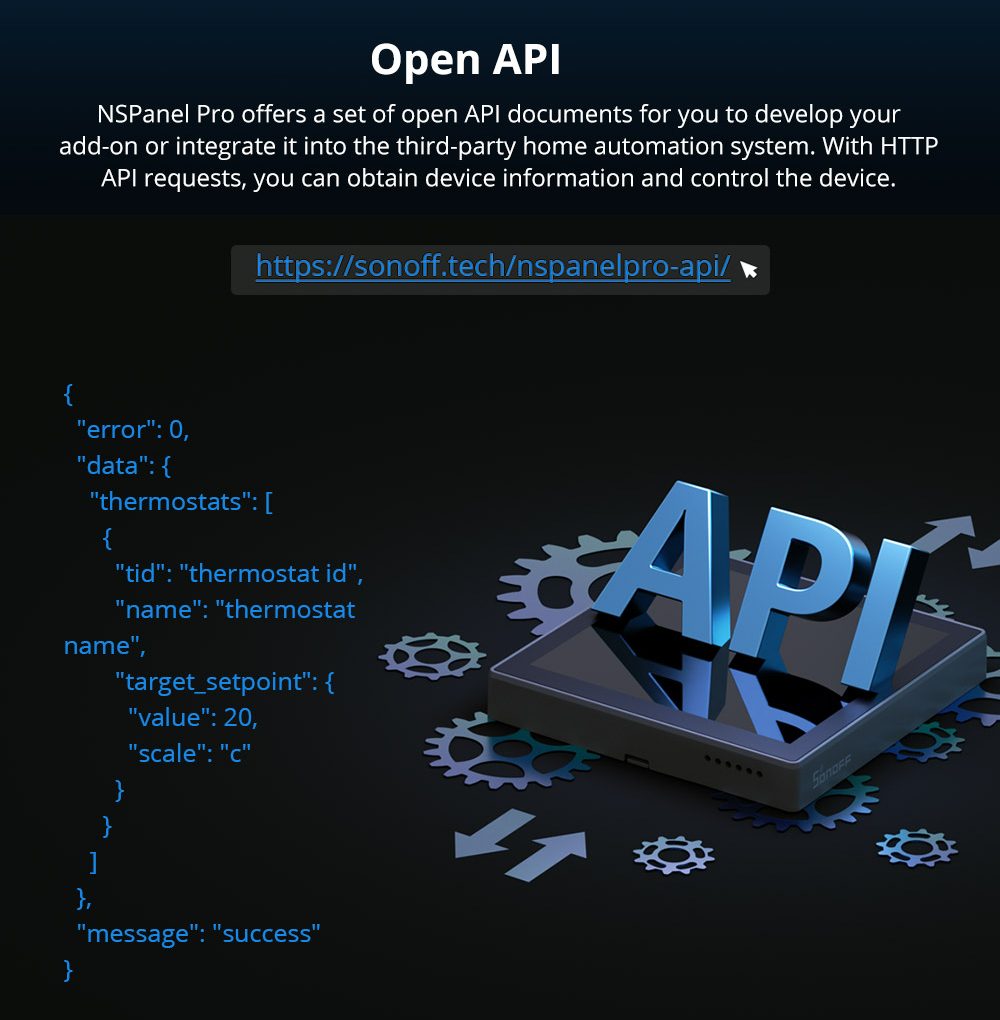
We are excited to announce the release of version 1.7.0 for NSPanel Pro and the NSPanel Pro HTTP API document for custom integrations or automation workflow developments. Since the NSPanel Pro was launched, we have been encouraged by the positive feedback and suggestions we have received from our customers. In our initial product description, we outlined our future plans, which included features such as Power Consumption, Temperature and Humidity Graph, and Call Intercom. We are pleased to report that we have gradually fulfilled our promises and implemented the key planned features.

We have been working hard to ensure that this version is packed with exciting new features and capabilities to help you get the most out of your panel. As you may know, our feature timeline shows the "Planned" and "Completed" features and their corresponding versions. In addition, some new features were also developed such as webpages, Homebridge, and Node-RED, which were not part of the original plan. We believe these new features will add significant value to your experience with NSPanel Pro. The Rhythm Live feature is still in progress as we prioritize bug fixes and other critical feature development. We appreciate your understanding and patience as we work to deliver the best possible product.
We are committed to providing you with a panel that meets your needs and exceeds your expectations. To that end, we will continue to work hard to deliver new and exciting features that will make your experience with NSPanel Pro even better. Thank you for your continued support, and please do not hesitate to reach out to us if you have any questions or concerns.

Looking forward to 2023, we plan to launch a new round of Future Plans, continuing to bring everyone a better user experience and making NSPanel Pro a feature-rich central control screen. We appreciate your continuous support and thank you for being part of the NSPanel Pro community.
NSPanel Pro V1.7.0 Release!
In the latest 1.7.0 version, NSPanel Pro has added some new features, including support for Homebridge and Node-RED. You can control the device on the Home APP through Homebridge, or realize more diverse device control and management through Node-RED. After this version update, we also released the NSPanel Pro API documentation, we hope you like it.
New Updates:
1. Support display Temp. & Humi. data from other temperature sources on the main screen.
2. Support always-on display – Set ‘Never’ Auto-Lock in ‘Settings-Display’.
3. Support Homebridge, allowing you to sync the Zigbee sub-devices in NSPanel Pro to Homebridge, and control them in the Home App.
4. Support Node-RED, allowing you to manage and control devices through “nodes” and “flows”.
5. Support switching between 24-hour and 12-hour formats.
6. Added six new languages: Afrikaans, Czech, Hungarian, Slovenian, Vietnamese, and Thai.
Learn more about its updates: https://bit.ly/3D4GqwS
NSPanel Pro API Document: https://sonoff.tech/nspanelpro-api/

NSPanel Pro V1.5.0 Release!
Dear customers,
We release version 1.5.0 in December, supporting more new features! Hope to bring you a better experience.
1. Added Webpages function, which can save webpage links in the APP and access them on NSPanel Pro
2. Added panel-to-panel voice call function, call another NSPanel Pro of the same account through NSPanel Pro at any time
3. Support clicking the weather icon to check the weather forecast for the next 7 days
4. Add execution actions in smart scene – setting the Security Mode and Screen Status in APP smart scene
5. Support setting multi-screen device lists and scene lists, and name them individually
6. Supporting viewing the energy consumption data of the past 7 days on Device Consumption

Better stability and compatibility for NSPanel Pro Zigbee Networking in V1.3.3!
Dear customers,
The new 1.3.3 version optimized the Zigbee framework for better compatibility and stability, improved device control and simultaneous pairing of multiple devices experience, and is compatible with more Zigbee sub-devices from other manufacturers.
What tests about NSPanel Pro's Zigbee ability did we do? Which Device Types can be added in NSPanel Pro? This post will show some of our test results and the possibility to add third-party devices.

Sync Zigbee sub-devices from NSPanel Pro to HA, as well as sync lights and switches on HA to NSPanel Pro!
Dear customers,
In the latest version 1.3.2, you can sync Zigbee sub-devices from NSPanel Pro to HA, as well as sync lights and switches on HA to NSPanel Pro.

When you install the eWeLink add-on on HA, you can visit the WebUI of the add-on after starting by tapping ‘OPEN WEB UI or the ‘eWeLink smart home’ menu in the left sidebar, and log in with your eWeLink account to pull the devices here, such as the Zigbee sensor be added to your NSPanel Pro. And you can sync eWeLink supported devices to Home Assistant entities and dashboard.


Also, you can sync your Home Assistant devices to the eWeLink ecosystem, and then control them via eWeLink APP and NSPanel Pro.


Learn how to install and use eWeLink add-on on HA: https://bit.ly/3ClzLNR
Watch the video about Two-way Sync Between NSPanel Pro and Home Assistant Devices: https://www.youtube.com/watch?v=wAMIKhMkSFA
Attention: NSPanel Pro V1.3.2 Upgrade
Dear customers,
In this upgrade, We urgently fixed a high-risk vulnerability of the access of SSH and ADB remote permissions. Now we turn off the SSH and ADB permissions by default in V1.3.2.
The ADB function enabled by default allows you to install third-party applications on NSPanel Pro, greatly expanding the application scope of the device. However, most consumers do not understand the potential risk and consequence of installing third-party applications as the SSH and ADB access permissions are enabled by default, the third-party application may access your private data, share your data with other parties, etc., or even install apps without your permission which will lead to situations in which data loss, system instability, and even malfunction.
After internal discussion and evaluation with the legal department, it is necessary to protect the safety of most consumers' devices, thus, we urgently upgraded the firmware. In version 1.3.2, we decide to turn off the SSH and ADB permissions of the system by default to ensure NSPanel Pro can not be accessed directly in the local area network.
On the other hand, we also understand that some users still want to be able to install third-party apps and perform various independent system configurations, so we have added a hidden developer mode entry, and you can choose to enable the ADB function for NSPanel Pro when you enter the developer mode.
*Quickly tap the Device ID 8 times to enable developer mode in APP Device Settings.

We need to remind you that once you turn on the ADB function, it means that we cannot guarantee that any operations you perform on the device are safe, reliable, and legal. SONOFF and any other related partners will not assume any legal responsibility for the consequences.
After the ADB function is turned on, we can no longer guarantee the reliable operation of NSpanle Pro, so we will not admit any legal responsibility for the device in the future, and users who turn on this function are deemed to have waived the warranty service. Therefore, before enabling the developer mode and ADB functions, please evaluate and be aware of all possible risks.
NSPanel Pro V1.3.1 Release!
Dear customers,
Now you can upload your picture as the wallpaper in V1.3.1! Besides, some new features are coming too.
1. Added the custom wallpaper function, which supports uploading pictures in the APP as the wallpaper of NSPanel Pro.
2. Added the Device Consumption function, you can view the weekly power consumption.
3. Support manual configuration, in the Screen Settings, you can choose whether to display the Smart Scenes, Thermostat, Device Consumption page on NSPanel Pro.
4. Optimized the thermostat function to support more temperature sources.
5. The group you set will display the group icon on the panel.

Let NSPanel Pro act as a thermostat! Keep you at a comfortable temperature.
Dear customers,
Today we want to introduce the thermostat settings in version 1.2.0 and hope you will like this function.
It is easy to set. Choose an external temperature source such as TH16 which will accurately display the room temperature in NSPanel Pro. Then add execution devices such as MINI, Basic, etc. to control heaters or coolers on/off. And your home will keep at a comfortable temperature.
In Manual Mode, you can adjust the desired temperature on the panel at any time.

In Auto Mode, you can set the effective time and temperature for the temperature. When the effective time is reached, your execution devices will automatically perform cooling or heating.

NSPanel Pro can be set up to 10 thermostats. Enjoy a comfortable temperature in each room!

In the next version, NSPanel Pro will support more types of external temperature sources, and display temperature and humidity charts. Of course, we will keep updating. Stay tuned for more updates coming soon and help us spread the word by sharing our campaign on social media.
Control your Philips Hue Bulbs! NSPanel Pro is compatible with Philips Hue now!
Dear customers,
Thank you so much for your support and patience. We have received your valuable advice and we'll keep updating NSPanel Pro to make it better match your expectations. Today we share the latest progress of NSPanel Pro.
NSPanel Pro supports adding Philips Hue Zigbee bulbs and controlling them now! You can turn on/off and adjust brightness, color temperature, and colors in the device settings. Warm light? Red light? Adjusting your Philips Hue bulb by NSPanel Pro right now!
Not only Philips Hue but we will also support more third-party lights in the future. Which brand of bulbs would you like to control by NSPanel Pro? Welcome to drop us a line in the comments section and if you can, please help us spread the word by sharing our campaign on social media.
Customer Reviews
Good product, good quality, It is working as described. I have purchased 4 nos. Thank you Itead team
I purchased it to have a solid interface to operate all my gadgets with the use of ihost. However it does not communicate with zigbee devices already pared in ihost. You have to do it first in cpanel then ihost. Loosing all the security of having everything in your local network. I do not recommend if you want to keep yours devices in your local networks, if not go for it.
We already sent you an email to check the problem. Please confirm and reply us via email. Please don't worry, we will try our best to help you solve the problem.
It crashed 2 times with different firmware versions, leaving me in the dark with some lights and forcing me to redo the pairing of all the devices in the house.
Now I don't consider it reliable and will use ihost as a zigbee bridge. Even the thermostat function did not fully convince me, as it is slow to operate the assigned device, and not always accurate with the temperature... in my opinion the choice not to integrate any relay output did not pay off much.
Given the cost, I don't recommend purchasing it.
I thought this is more powerful than it's Tuya counterpart until internet outage affected me and oh boy, ONLY zigbee devices can be controlled and NONE of sonoff wifi devices are controllable. In comparison, the 4" Tuya touch can control all, I repeat, ALL devices whether zigbee or wifi in offline mode / no internet. Super disappointed. I hope they can software update this.
We sent you an email to confirm the problem, please check and confirm us the details.
I purchased this NSPANEL PRO along with several other Zigbee devices in the middle of December. I have been trying for the past month to get this working. I have contacted Sonoff/Itead support through the App and by email. What little response was of no help at all. I have had no further response from them for the past month even though I have contacted them several times, last message I sent was a week ago and still no response. I now have several Zigbee devices and more that I ordered in December, that I am still waiting for, which are absolutely of no use without the NSPANEL PRO working. I have even asked for a replacement as this one appears to be faulty, but again no response. I have been using Sonoff devices for several years without problem but I am now seriously considering returning these and cancelling the others that I am waiting for and changing to Tuya or some other reliable brand. The customer service and technical help has been little short of useless! I have only given this 1 star as I can't get it working and therefore unable to give it more!
May I know which email you sent to Sonoff support? We did not receive it, if device problem, you can send an email to our support: support@itead.cc
And for the NS panel pro that can not pair, could you show us a video to check the problem?
Please make sure you use 2.4G wifi at home.
Un día cualquiera , en varias ocasiones han aparecido todos los SUB-dispositivos desconectados en la app eWeLink sin razón aparente, revisando que el NSPro estaba correctamente conectado a la energia y a mi red wifi ... Muy extraño eso !
Además no encuentro manera para ver lo que Sonoff llama ZIGBEE NETWORK TOPOLOGY MAP publicado en el PLAN DE FUNCIONES año 2023 : Ayuda ???
Please try to move the NS panel pro near the router. The ZigBee network map plan was canceled. We will check if in the future we will add or not.
Hello
I received the order very quickly, thank you.
I am in the testing phase of NS panel pro. I generally liked it. In my tests, I saw that the screen was not fluent. I can see 4 devices on the square screen, I wonder how it would be if 6 or 8 devices were visible. I can share the problems I see with you here.
In the user manuals of Sonoff products, how to install is explained first, but there is no information on how to make settings. YouTube videos are inadequate.
Thanks Itead.
Weak signal from the Zigbee radio module. I have 4 Sonoff Zigby temperature sensors (with and without a screen), and three Sonoff thermostats for radiators. Thermostats are constantly connected to the NSpanel, temperature sensors regularly lose their signal, sometimes for a couple of hours, sometimes forever. Distances from the NSpanel to temperature sensors are from one to 6 meters. The signal can be lost from any sensor, regardless of distance. The Zigbee signal amplification function in the panel is enabled (when the same sensors are connected to the iHost, there is almost no loss). A weak radio module in the NSpanel plus a weak signal from the sensors make it impossible to use scenarios that involve temperature sensors due to their unpredictable behavior. I have no desire to buy additional devices with a repeater function; I have already spent enough money on Sonoff products...
Also, I would like to note that the NSpanel screen sensor does not respond clearly; you often have to swipe your finger across the screen several times to scroll through the screens.
I see the sensors connected to the NS panel in Evelink, but they do not work stably. Sensors connected to iHost work more stable, but I don’t see them in Evelink to control them remotely. Is this done deliberately for marketing purposes?
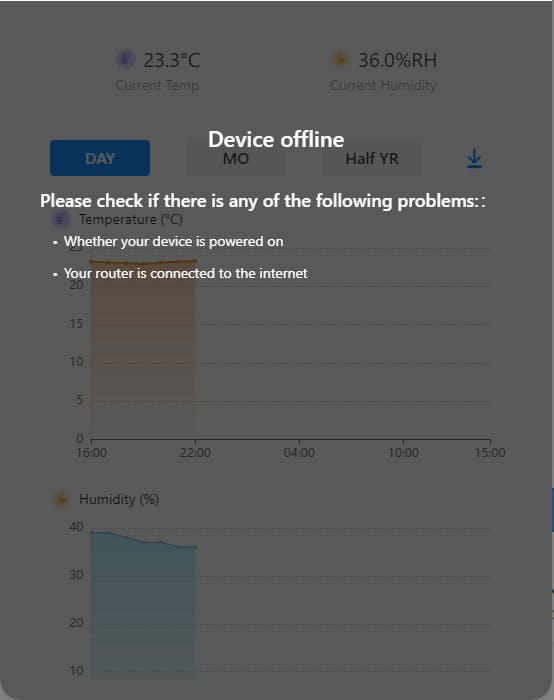
I have removed all ZB end devices added to NS panel Pro as the device becomes unavailable very ferquently when other ZB bridges and wifi devices in same network works fine. Now using the NS panel pro to see the time and weather update.
Did you add the NSPanel Pro to the eWeLink app? Please show us the device ID.
One of the power screws cross-threaded when I got it out of the box so unable to tighten and worried to use it.
New Arrival
-
 New
NewSONOFF ZBMINI Extreme Zigbee Smart Switch (Neutral Wire Required) | ZBMINIR2
USD$12.90 Add to cart -
Sale!
 New-25%
SONOFF NSPanel Pro Smart Home Control Panel-120 Type
Original price was: USD$119.90.USD$89.90Current price is: USD$89.90. Select options This product has multiple variants. The options may be chosen on the product page -

SONOFF Zigbee Smart Water Valve
USD$26.90 Select options This product has multiple variants. The options may be chosen on the product page -
 New
NewSONOFF iPlug Zigbee Smart Plug | S60 Series
USD$13.50 Select options This product has multiple variants. The options may be chosen on the product page -
 New
NewSONOFF MINI Dry Wi-Fi Smart Switch | MINI-D
USD$12.90 Add to cart -
 New
NewSONOFF SNZB-02LD IP65 Zigbee LCD Smart Thermometer (Probe Version)
USD$17.90 Add to cart
